Manage email notifications

Manage email notifications

1. To manage your email notifications, click on your name in the upper right corner of the screen and from drop-down menu choose the Profile Settings.

2. Below your username and biography, there is an option that enables you to Turn on or Turn off your email notifications. If you Turn Off your email notifications, you will not receive emails when the actions are performed on the Innovation Cloud.
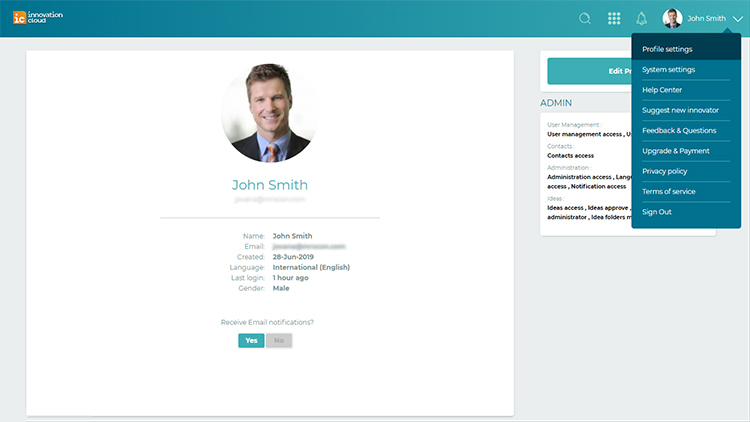
IC email nofitications


    • Related Articles

    • FAQs: Workflow Rules

      What is a workflow rule? Workflow rules in Zoho CRM are designed to enhance productivity of the users and reduce manual work by automating routine activities in a business process. They allow you to create rules that can trigger different action ...
    • Setting up approval flow

      Feature availability Plan Free Express Professional Approval Flow ❌ ❌ ✅ You can set up an approval process for articles within your knowledge base. You can assign specific manual admins or contributors as approvers and make sure articles within the ...
    • TOC test article

      Introduction Once you have successfully imported clients from the accounting software, the next step is to submit the Job to the Auditor. While submitting the job to the auditor, you have an option to Upload Documents and then Review and Submit. How ...
    • HOW TO SIGN UP HELP DESK PORTAL

      Sangat mudah untuk mendaftarkan diri anda pada portal Help Desk Solusindo Total Teknikatama Cukup klik kata2 Sign Up dan ikuti permintaan data seperti ; 1. Nama Lengkap Anda 2. Email Aktif Anda Pastikan alamat email aktif anda ditulis dengan benar. ...
    • Setting up your domain

      IMPORTANT: Only the Administrator of your Innovation Cloud Startup environment have access to the System settings options. To configure system details: 1. Click on your name in the upper right corner of the screen and from the drop-down menu choose ...